[Servlet] 성적 처리 리스트
2022.02.21(41일 차)
오늘 수업이 끝나고 내줬던 성적 처리 리스트를 정리 해서 포스팅!
예전에 만들었던 JSP 성적 처리 리스트를 Servlet으로 만들면 된다!
서블릿 매핑 정보( web.xml)
web.xml
<servlet>
  	<servlet-name>scoreServlet</servlet-name>
  	<servlet-class>com.score.ScoreServlet</servlet-class>
  </servlet>

  <servlet-mapping>
  	<servlet-name>scoreServlet</servlet-name>
  	<url-pattern>/jumsu/*</url-pattern>
  </servlet-mapping>
1. <servlet-class> 에는 서블릿 클래스의 실제 주소를 적어줘야 합니다. (대소문자 주의!)
2. <url-pattern> 에는 가상 주소를 적어줘야합니다.
Servlet 클래스 생성 - ScoreServlet.java
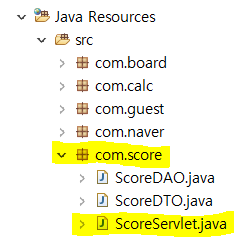
성적 처리 리스트 또한 이전 게시판처럼 ScoreDAO, ScoreDTO, score테이블을 그대로 사용하므로 위의 경로에
서블릿 클래스를 생성해준다.
ScoreServlet.java
package com.score;

import java.io.IOException;
import java.sql.Connection;
import java.util.List;

import javax.servlet.RequestDispatcher;
import javax.servlet.ServletException;
import javax.servlet.http.HttpServlet;
import javax.servlet.http.HttpServletRequest;
import javax.servlet.http.HttpServletResponse;

import com.util.DBConn;

public class ScoreServlet extends HttpServlet{

	private static final long serialVersionUID = 1L;

	@Override
	protected void doGet(HttpServletRequest req, HttpServletResponse resp) throws ServletException, IOException {
		doPost(req, resp);
	}

	protected void forward(HttpServletRequest req, HttpServletResponse resp, String url) throws ServletException, IOException {

		RequestDispatcher rd =
				req.getRequestDispatcher(url);

		rd.forward(req, resp);
	}

	@Override
	protected void doPost(HttpServletRequest req, HttpServletResponse resp) throws ServletException, IOException {

		req.setCharacterEncoding("UTF-8");

		Connection conn = DBConn.getConnection();
		ScoreDAO dao = new ScoreDAO(conn);


		String cp = req.getContextPath();
		String uri = req.getRequestURI();
		String url;
		// 데이터 출력
		if(uri.indexOf("write.do")!= -1 ) {

			url = "/sung/write.jsp";
			forward(req, resp, url);

		// 추가
		}else if(uri.indexOf("write_ok.do")!= -1) {

			ScoreDTO dto = new ScoreDTO();

			dto.setHak(req.getParameter("hak"));
			dto.setName(req.getParameter("name"));
			dto.setKor(Integer.parseInt(req.getParameter("kor")));
			dto.setEng(Integer.parseInt(req.getParameter("eng")));
			dto.setMat(Integer.parseInt(req.getParameter("mat")));

			dao.inserData(dto);

			url = cp + "/jumsu/list.do";
			resp.sendRedirect(url);

		}else if(uri.indexOf("list.do")!= -1) {

			List<ScoreDTO> lists = dao.getLists();
			req.setAttribute("lists", lists);

			url = "/sung/list.jsp";
			forward(req, resp, url);

		// 삭제
		}else if(uri.indexOf("updated.do")!= -1) {

			String hak = req.getParameter("hak");

			ScoreDTO dto = dao.getReadData(hak);

			req.setAttribute("dto", dto);

			url = "/sung/updated.jsp";
			forward(req, resp, url);

		}else if(uri.indexOf("update_ok.do")!=-1){

			ScoreDTO dto = new ScoreDTO();
			dto.setName(req.getParameter("name"));
			dto.setHak(req.getParameter("hak"));
			dto.setKor(Integer.parseInt(req.getParameter("kor")));
			dto.setEng(Integer.parseInt(req.getParameter("eng")));
			dto.setMat(Integer.parseInt(req.getParameter("mat")));

			dao.updateData(dto);

			url = cp + "/jumsu/list.do";
			resp.sendRedirect(url);


		}else if(uri.indexOf("delete_ok.do")!=-1){

			String hak = req.getParameter("hak");

			dao.deleteData(hak);

			url = cp + "/jumsu/list.do";
			resp.sendRedirect(url);
		}
	}
}
jsp페이지 생성
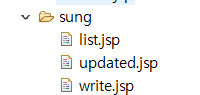
jsp파일 또한 기존에 jsp로 만들었던 성적처리 리스트 페이지를 그대로 가져오면 된다.
_ok를 뺀 list.jsp, updated.jsp, write.jsp 파일 3개를 복사해온다. 그리고 수정한다.
list.jsp - 리스트 조회 페이지
<%@ page contentType="text/html; charset=UTF-8"%>
<%@ taglib prefix="c" uri="http://java.sun.com/jsp/jstl/core" %>
<%
	request.setCharacterEncoding("UTF-8");
	String cp = request.getContextPath();
%>
<!DOCTYPE html PUBLIC "-//W3C//DTD HTML 4.01 Transitional//EN" "http://www.w3.org/TR/html4/loose.dtd">
<html>
<head>
<meta http-equiv="Content-Type" content="text/html; charset=UTF-8">
<title>성적처리 리스트</title>
<style type="text/css">

body {
	font-size: 10pt;
}

td {
	font-size: 10pt;
}

.txtField {
	font-size: 10pt;
	border: 1px solid;
}

.btn {
	font-size: 10pt;
	background: #e6e6e6
}


a {
	text-decoration: none;
	color: blue;
}

</style>
<script type="text/javascript">
	function sendIt(){
		var f = document.searchForm;
		f.action = "<%=cp %>/jumsu/list.do";
		f.submit();
	}
</script>

</head>
<body>

<br><br>

<table width="700" cellpadding="0" cellspacing="3" align="center" bgcolor="#e4e4e4">
<tr height="50">
	<td bgcolor="#ffffff" style="padding-left: 10px;'">
	<b>성적처리 리스트 화면(Servlet)</b>
	</td>
</tr>
</table>

<br>
<table width="650" cellpadding="0" cellspacing="3" align="center">
<tr height="35">
	<td align="right">
	<input type="button" class="btn" value="성적입력" onclick="javascript:location.href='<%=cp %>/jumsu/write.do';">
	</td>
</tr>
</table>
<table width="650" cellpadding="0" cellspacing="1" align="center" bgcolor="#cccccc">
<tr height="30">
	<td align="center" bgcolor="#e6e6e6" width="80">학번</td>
	<td align="center" bgcolor="#e6e6e6" width="80">이름</td>
	<td align="center" bgcolor="#e6e6e6" width="60">국어</td>
	<td align="center" bgcolor="#e6e6e6" width="60">영어</td>
	<td align="center" bgcolor="#e6e6e6" width="60">수학</td>
	<td align="center" bgcolor="#e6e6e6" width="60">총점</td>
	<td align="center" bgcolor="#e6e6e6" width="60">평균</td>
	<td align="center" bgcolor="#e6e6e6" width="60">석차</td>
	<td align="center" bgcolor="#e6e6e6" width="130">수정</td>
</tr>
<c:forEach var="dto" items="${lists }">
<tr height="30">
	<td align="center" bgcolor="#ffffff">${dto.hak }</td>
	<td align="center" bgcolor="#ffffff">${dto.name }</td>
	<td align="center" bgcolor="#ffffff">${dto.kor }</td>
	<td align="center" bgcolor="#ffffff">${dto.eng }</td>
	<td align="center" bgcolor="#ffffff">${dto.mat }</td>
	<td align="center" bgcolor="#ffffff">${dto.tot }</td>
	<td align="center" bgcolor="#ffffff">${dto.ave }</td>
	<td align="center" bgcolor="#ffffff">${dto.rank }</td>
	<td align="center" bgcolor="#ffffff">

	<a href="updated.do?hak=${dto.hak }">수정</a>
	<a href="delete_ok.do?hak=${dto.hak }">삭제</a></td>

</tr>
</c:forEach>
</table>
</body>
</html>
updated.jsp - 성적 수정 페이지
<%@ taglib prefix="c" uri="http://java.sun.com/jsp/jstl/core" %>
<%@ page contentType="text/html; charset=UTF-8"%>
<%
	request.setCharacterEncoding("UTF-8");
	String cp = request.getContextPath();
%>
<!DOCTYPE html PUBLIC "-//W3C//DTD HTML 4.01 Transitional//EN" "http://www.w3.org/TR/html4/loose.dtd">
<html>
<head>
<meta http-equiv="Content-Type" content="text/html; charset=UTF-8">
<title>성적처리 수정</title>
<script type="text/javascript">
	function sendIt(){

		var f = document.myForm;
		f.action ="<%=cp %>/jumsu/update_ok.do";
		f.submit();
	}
</script>

<style type="text/css">

body {
	font-size: 10pt;
}

td {
	font-size: 10pt;
}

.txtField {
	font-size: 10pt;
	border: 1px solid;
}

.btn {
	font-size: 10pt;
	background: #e6e6e6
}


a {
	text-decoration: none;
	color: blue;
}

</style>
</head>
<body>
<br/><br/>

<table width="500" cellpadding="0" cellspacing="3" align="center" bgcolor="#e4e4e4">
<tr height="50">
	<td bgcolor="#ffffff" style="padding-left:10px;">
		<b>성적처리 수정화면(Servlet)</b>
	</td>
</tr>
</table>
<br/>
<form action="" method="post" name="myForm">
<table width="500" cellpadding="0" cellspacing="0" align="center">
<tr height="2"><td colspan="2" bgcolor="#cccccc"></td></tr>
<tr height="30">
	<td align="center" width="100" bgcolor="#e6e6e6">학번</td>
	<td style="padding-left: 5px;">
	${dto.hak }
	<input type="hidden" value="${dto.hak }" name="hak">
	</td>
</tr>
<tr height="1"><td colspan="2" bgcolor="#cccccc"></td></tr>
<tr height="30">
	<td align="center" width="100" bgcolor="#e6e6e6">이름</td>
	<td style="padding-left: 5px;">
	${dto.name }
	<input type="hidden" value="${dto.name }" name="name">
	</td>
</tr>
<tr height="1"><td colspan="2" bgcolor="#cccccc"></td></tr>
<tr height="30">
	<td align="center" width="100" bgcolor="#e6e6e6">국어</td>
	<td style="padding-left: 5px;">
	<input type="text" name="kor" value="${dto.kor }"size="20" maxlength="3" class="txtField"/>
	</td>
</tr>
<tr height="1"><td colspan="2" bgcolor="#cccccc"></td></tr>
<tr height="30">
	<td align="center" width="100" bgcolor="#e6e6e6">영어</td>
	<td style="padding-left: 5px;">
	<input type="text" name="eng" value="${dto.eng }"size="20" maxlength="3" class="txtField"/>
	</td>
</tr>
<tr height="1"><td colspan="2" bgcolor="#cccccc"></td></tr>
<tr height="30">
	<td align="center" width="100" bgcolor="#e6e6e6">수학</td>
	<td style="padding-left: 5px;">
	<input type="text" name="mat" value="${dto.mat }" size="20" maxlength="3" class="txtField"/>
	</td>
</tr>
<tr height="2"><td colspan="2" bgcolor="#cccccc"></td></tr>

<tr height="35" >
	<td align="center" colspan="2">
	<input type="button" class="btn" value="수정완료" onclick="sendIt()"/>
	<input type="button" class="btn" value="수정취소" onclick="javascript:location.href='<%=cp %>/jumsu/list.do';">
	</td>
</tr>
</table>
</form>
</body>
</html>
write.jsp - 성적 입력 페이지
<%@ page contentType="text/html; charset=UTF-8"%>
<%
	request.setCharacterEncoding("UTF-8");
	String cp = request.getContextPath();//특정 폴더를 쉽게 지칭하기 위한 시스템변수 개념으로 사용
	//Context가 나오면 프로젝트안에서 전체적으로 모두 사용할 수 있음
	//http://192.168.16.16:8080/study
%>
<!DOCTYPE html PUBLIC "-//W3C//DTD HTML 4.01 Transitional//EN" "http://www.w3.org/TR/html4/loose.dtd">
<html>
<head>
<meta http-equiv="Content-Type" content="text/html; charset=UTF-8">
<title>성적처리 입력화면</title>
<script type="text/javascript">
	function sendIt(){
		var f = document.myForm;

		f.action ="<%=cp %>/jumsu/write_ok.do";
		f.submit();
	}
</script>

<style type="text/css">

body {
	font-size: 10pt;
}

td {
	font-size: 10pt;
}

.txtField {
	font-size: 10pt;
	border: 1px solid;
}

.btn {
	font-size: 10pt;
	background: #e6e6e6
}


a {
	text-decoration: none;
	color: blue;
}

</style>
</head>
<body>
<br/><br/>

<table width="500" cellpadding="0" cellspacing="3" align="center" bgcolor="#e4e4e4">
<tr height="50">
	<td bgcolor="#ffffff" style="padding-left:10px;">
		<b>성적처리 입력화면(Servlet)</b>
	</td>
</tr>
</table>
<br/>
<form action="" method="post" name="myForm">
<table width="500" cellpadding="0" cellspacing="0" align="center">
<tr height="2"><td colspan="2" bgcolor="#cccccc"></td></tr>
<tr height="30">
	<td align="center" width="100" bgcolor="#e6e6e6">학번</td>
	<td style="padding-left: 5px;">
	<input type="text" name="hak" size="10" maxlength="7" class="txtField"/>
	</td>
</tr>
<tr height="1"><td colspan="2" bgcolor="#cccccc"></td></tr>
<tr height="30">
	<td align="center" width="100" bgcolor="#e6e6e6">이름</td>
	<td style="padding-left: 5px;">
	<input type="text" name="name" size="20" maxlength="10" class="txtField"/>
	</td>
</tr>
<tr height="1"><td colspan="2" bgcolor="#cccccc"></td></tr>
<tr height="30">
	<td align="center" width="100" bgcolor="#e6e6e6">국어</td>
	<td style="padding-left: 5px;">
	<input type="text" name="kor" size="20" maxlength="3" class="txtField"/>
	</td>
</tr>
<tr height="1"><td colspan="2" bgcolor="#cccccc"></td></tr>
<tr height="30">
	<td align="center" width="100" bgcolor="#e6e6e6">영어</td>
	<td style="padding-left: 5px;">
	<input type="text" name="eng" size="20" maxlength="3" class="txtField"/>
	</td>
</tr>
<tr height="1"><td colspan="2" bgcolor="#cccccc"></td></tr>
<tr height="30">
	<td align="center" width="100" bgcolor="#e6e6e6">수학</td>
	<td style="padding-left: 5px;">
	<input type="text" name="mat" size="20" maxlength="3" class="txtField"/>
	</td>
</tr>
<tr height="2"><td colspan="2" bgcolor="#cccccc"></td></tr>

<tr height="35" >
	<td align="center" colspan="2">
	<input type="button" class="btn" value="입력완료" onclick="sendIt()"/>
	<input type="reset" class="btn" value="다시입력" onclick="document.myForm.hak.focus();">
	<input type="button" class="btn" value="입력취소" onclick="javascript:location.href='<%=cp %>/jumsu/list.do';">
	</td>
</tr>
</table>
</form>
</body>
</html>
완성 화면

성적 처리 리스트는 설명 생략!
설명이 필요하면 이전 글 확인하기!
https://backendcode.tistory.com/75
[Servlet] 게시판
2022.02.21(41일 차) 오늘은 Servlet 게시판 만들기! 숙제 : Servlet 성적처리 페이지 만들기 - (따로 포스팅 예정) 오늘의 수업 내용 오늘은 예전에 JSP 게시판을 만들었던 것을 Servlet으로 만들어볼 예정입
backendcode.tistory.com